{{doc wmsread}}
Download and display a Sentinel 2 image
First we have to start by fetching the information provided by this Web Map Server
julia> wms = wmsinfo("http://tiles.maps.eox.at/wms?")
serverURL:      http://tiles.maps.eox.at/wms?
OnlineResource: http://tiles.maps.eox.at/?
version:        1.1.1
request:        GetMap
layernames:     ["s2cloudless-2018_3857", "coastline", "s2cloudless-2020", "osm_3857", "s2cloudless_3857", "terrain_3857", "overlay_base_bright_3857", "hydrography", "graticules", "overlay_3857", "bluemarble", "coastline_black", "s2cloudless-2017_3857", "streets_3857", "overlay_bright", "s2cloudless-2019_3857", "overlay", "blackmarble_3857", "hydrography_3857", "s2cloudless-2017", "streets", "s2cloudless-2018", "s2cloudless-2019", "osm", "blackmarble", "terrain-light_3857", "s2cloudless-2020_3857_512", "bluemarble_3857", "overlay_base_3857", "s2cloudless", "terrain", "overlay_bright_3857", "coastline_3857", "s2cloudless-2020_3857", "magnetic_graticules", "terrain-light", "overlay_base_bright", "overlay_base"]

layer:  38 Layers. Use layer[k] to see the contents of layer k
Next, let’s look at the contents of the layer 3
julia> wms.layer[3]
name:   s2cloudless-2020
title:  Sentinel-2 cloudless layer for 2020 by EOX - 4326
srs:    EPSG:4326
crs:
bbox:   (-180.0, 180.0, -90.0, 90.0)
imgformat:      image/jpeg
tilesize:       256
overviewcount:  17
resolution:     5.3644180298e-6
tiled:  true
transparent:    false
And finaly download and display a low-resolution image of that layer 3 at 1500 m/pixel.
using GMT
wms = wmsinfo("http://tiles.maps.eox.at/wms?");
img = wmsread(wms, layer=3, region=(-10,-5,37,44), pixelsize=1500);
imshow(img, proj=:guess, title="Sentinel 2")
┌ Warning: This request returned an empty image.

└ @ GMT C:\Users\j\.julia\dev\GMT\src\extras\webmapserver.jl:156
BoundsError: attempt to access 0-element Vector{Float64} at index [1]

Stacktrace:
 [1] getindex
   @ .\essentials.jl:13 [inlined]
 [2] common_insert_R!(d::Dict{Symbol, Any}, O::Bool, cmd0::String, I_G::GMTimage{UInt8, 2}; is3D::Bool)
   @ GMT C:\Users\j\.julia\dev\GMT\src\grdimage.jl:193
 [3] common_insert_R!
   @ C:\Users\j\.julia\dev\GMT\src\grdimage.jl:178 [inlined]
 [4] grdimage(cmd0::String, arg1::GMTimage{UInt8, 2}, arg2::Nothing, arg3::Nothing; first::Bool, kwargs::@Kwargs{show::Bool, proj::Symbol, title::String})
   @ GMT C:\Users\j\.julia\dev\GMT\src\grdimage.jl:47
 [5] grdimage (repeats 2 times)
   @ C:\Users\j\.julia\dev\GMT\src\grdimage.jl:43 [inlined]
 [6] imshow(arg1::GMTimage{UInt8, 2}; kw::@Kwargs{proj::Symbol, title::String})
   @ GMT C:\Users\j\.julia\dev\GMT\src\imshow.jl:130
 [7] top-level scope
   @ In[2]:4
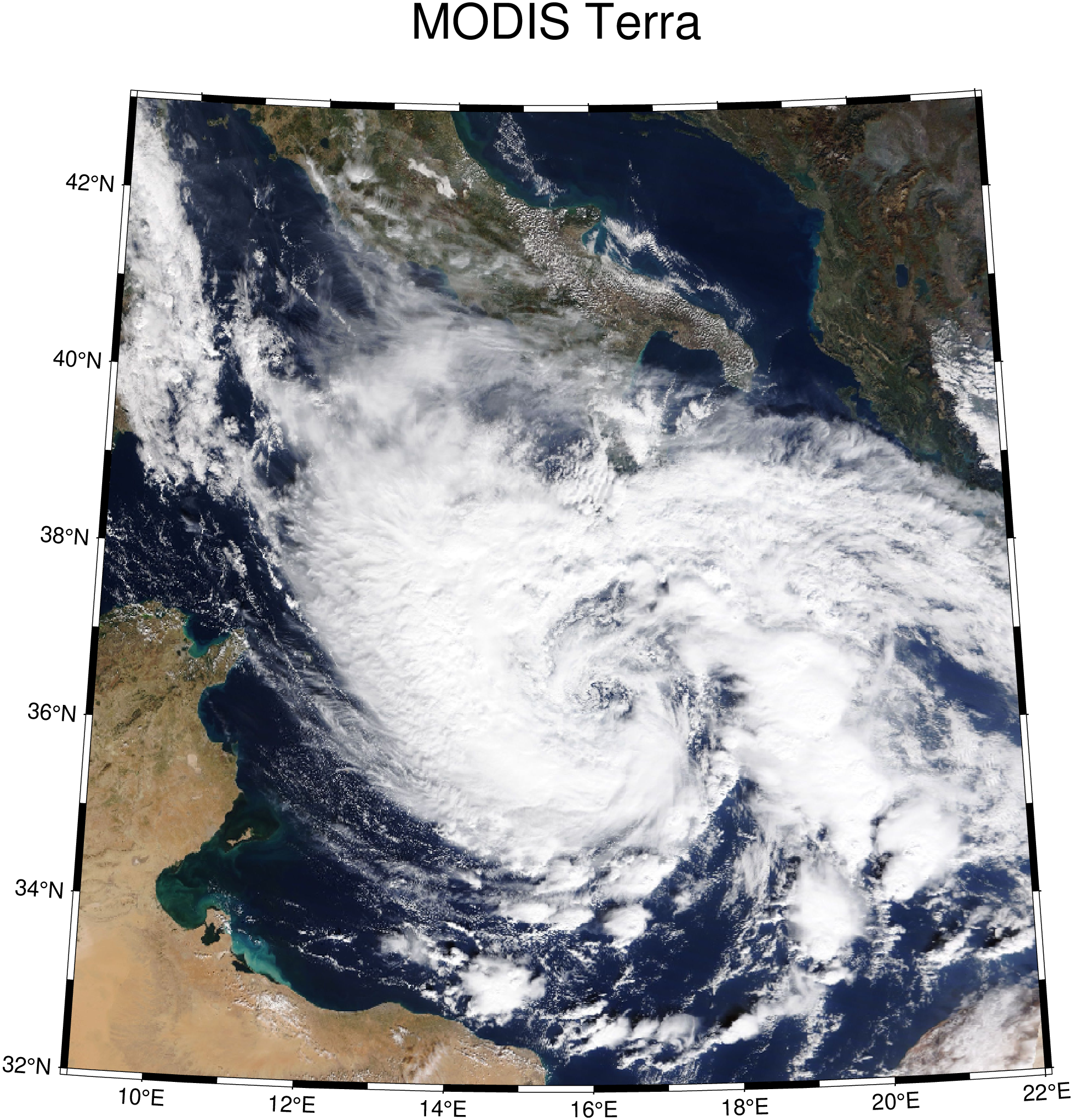
Download and display a MODIS image
Use the a WMS from NASA and download a MODIS Terra reflectance image from 29 October 2021
using GMT
wms = wmsinfo("https://gibs-c.earthdata.nasa.gov/wms/epsg4326/best/wms.cgi");
img = wmsread(wms, layer="MODIS_Terra_CorrectedReflectance_TrueColor", region=(9,22,32,43), time="2021-10-29T00:00:00", pixelsize=1500);
imshow(img, proj=:guess, title="MODIS Terra")