using GMT

I = gmtread(TESTSDIR * "assets/j.png");
J = immorphgrad(I, hsize=5, vsize=5);
grdimage(I, figsize=5)
grdimage!(J, figsize=5, xshift=5, show=true)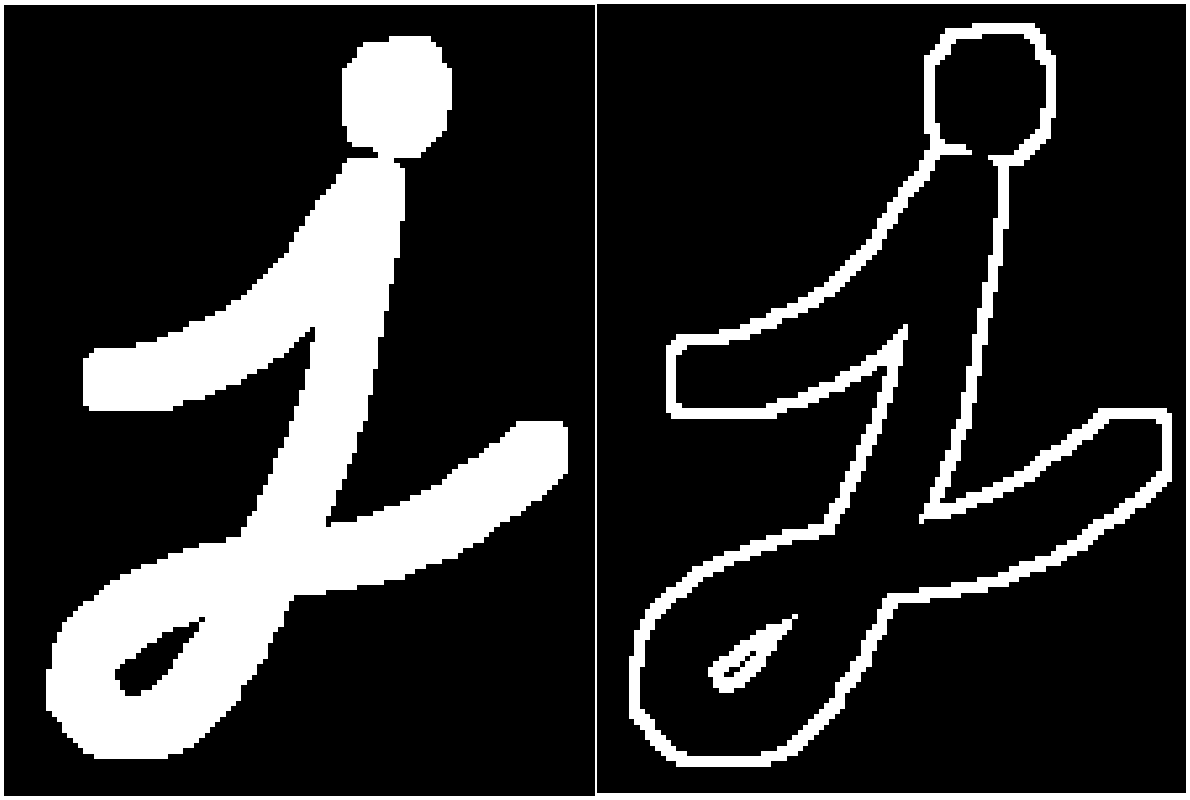
J = immorphgrad(I::Union{GMTimage{<:UInt8, 2}, GMTimage{<:Bool, 2}}; hsize=3, vsize=3, smooth=0)::GMTimageCompute the morphological gradient of a grayscale or binary image.
This is the difference between dilation and erosion of an image. The parameter smooth can be used to smooth the result.
I::Union{GMTimage{<:UInt8, 2}, GMTimage{<:Bool, 2}}: Input image.hsize::Int=3: Horizontal size of the ‘box’ structuring element.
vsize::Int=3: Vertical size of the ‘box’ structuring element.
smooth::Int=0: Half-width of convolution smoothing filter. The width is (2 * smoothing + 1), so 0 is no-op.
A new GMTimage of the same type as I with the morphological gradient applied.
The result will look like the outline of the object.
using GMT
I = gmtread(TESTSDIR * "assets/j.png");
J = immorphgrad(I, hsize=5, vsize=5);
grdimage(I, figsize=5)
grdimage!(J, figsize=5, xshift=5, show=true)
View the source code for this function.